A small setting worth testing
You don’t need an aimbot or triggerbot to experiment with your aim. This tip concerns Windows mouse behavior, not software that chooses targets or fires for you.
In my original 2020 test, turning off pointer acceleration felt unfamiliar at first, but I preferred the consistency after adjusting. That is a personal result, not a guarantee of more headshots.
What pointer acceleration changes
With acceleration, pointer movement depends in part on how quickly you move the mouse, rather than only on physical distance. Some players prefer a more consistent relationship between hand movement and cursor travel.
The original claim that hand-eye coordination is impossible to train with acceleration was too strong. People adapt to different setups, and preference matters.
Try turning off Enhance pointer precision
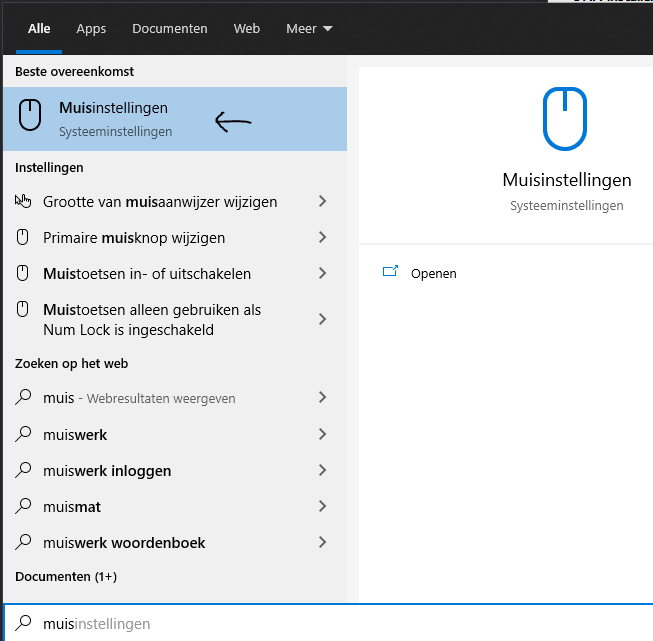
- Open Windows mouse settings.
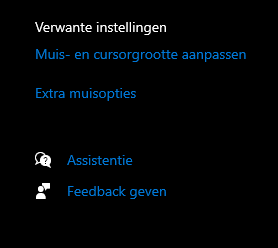
- Choose the additional mouse options to open the classic Mouse Properties dialog.
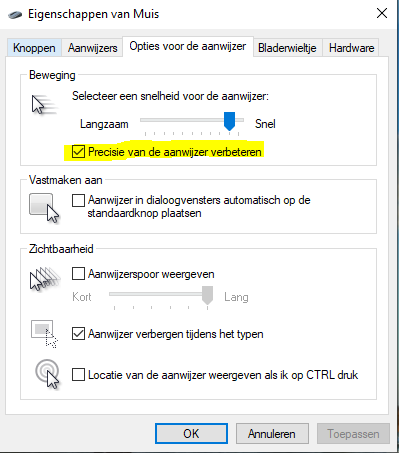
- Open the Pointer Options tab.
- Clear Enhance pointer precision, then apply the change.
- Try a familiar practice mode and allow time to adjust before deciding whether you prefer it.
Record your starting settings so you can restore them. Keep DPI and in-game sensitivity stable while comparing, rather than changing several things at once.
Check the game’s input path
Some games use raw mouse input and bypass parts of Windows pointer processing. In that case, the desktop setting may change your menus without changing in-game aiming in the same way.
Choose a comfortable sensitivity, practice consistently, and judge the result in the games you actually play. No mouse setting substitutes for learning movement, positioning, and timing.
Images from the original article