
Don’t leave your WordPress login unprotected
Heading out on vacation? Your website will keep receiving traffic while you’re away, including automated login attempts. A brute-force attack repeatedly tries credentials in the hope of finding a working combination.
This article was originally published in August 2017. Its main advice remains a useful starting point, but the screenshot and some techniques described in the original belong to that period.
Start with the account basics
- Use a strong, unique password for each account.
- Avoid predictable administrator names such as admin or test, while remembering that a username isn’t a substitute for a strong password.
- Give each user only the permissions their work requires.
- Remove accounts that are no longer needed and review who has administrator access.
The original article included a country-by-country attack table from a security plugin. Its time window and methodology weren’t recorded, so it isn’t useful as a current ranking. An IP address’s apparent location also doesn’t establish an attacker’s identity or nationality.
Restricting access at the server
The original walkthrough used Apache rewrite rules in .htaccess to allow login access from a particular IP address. That can be useful in a tightly controlled setup, but a copied rule can lock you out when your address changes or disrupt features that use admin endpoints.
Before adding restrictions, identify the web server and any reverse proxy involved, keep a working recovery method, and test the effect on ordinary visitors as well as administrators. Don’t overwrite the WordPress-managed rewrite section with an unrelated example.
Limit repeated login attempts
A security plugin or hosting control can help slow repeated attempts. My original preference was Wordfence, while the article also mentioned other login-protection tools. Choose controls that fit your hosting environment and check how they interact with protections already enabled.
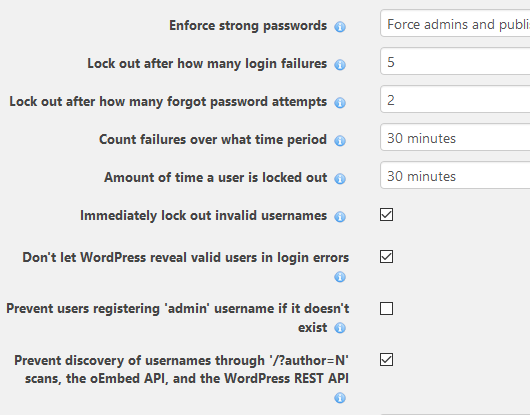
For current guidance, WordPress recommends strong passwords, two-factor authentication for administrators, software updates, and rate limits at an appropriate layer. See the official WordPress brute-force protection guide.
Running your own VPS?
If you administer the server, Fail2ban can watch suitable logs and trigger firewall actions for matching activity. Its effect depends on the jail and action configured; a ban doesn’t automatically make every service on the server unreachable.
The follow-up article explains the original Ubuntu and Fail2ban setup. On shared hosting, ask the provider which controls it supports rather than assuming you can change server-level settings.