A gadget I keep coming back to
I’ve owned my Starlink kit for a while, but it isn’t my daily internet connection. I already have a fixed connection at home. Every so often I take the older, larger dish out of storage, set it up, and see how it performs.
For me, the attraction is the technology: put a dish outside, provide power, and obtain a usable satellite connection. That makes it interesting both as a hobby and as a possible independent backup.
Easy setup, imperfect surroundings
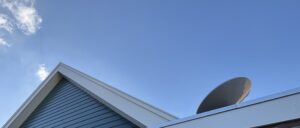
My motorized dish sits on its original stand during tests. I connect the router and power, then watch connection and obstruction information in the app. Other generations may need different alignment procedures.
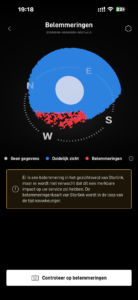
The view from my garden isn’t fully clear. Buildings and surroundings obstruct part of the sky, yet the connection has often been useful. That doesn’t make clear-sky guidance unnecessary; placement changes have noticeably worsened my results.
The speeds I measured
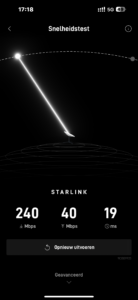
One test recorded about 240 Mbps down, 40 Mbps up, and 19 ms latency. Another recorded approximately 179 Mbps down, 19 Mbps up, and 21 ms latency. Across my tests, latency was often in the roughly 19–35 ms range.
These are measurements from my own setup, not promised speeds. Time of day, local capacity, Wi-Fi, hardware, and obstructions can all affect them.
Gaming and short interruptions
Browsing, streaming, and ordinary work felt surprisingly normal. Gaming was also practical much of the time, although a brief interruption is more noticeable in a competitive game than while loading a webpage.
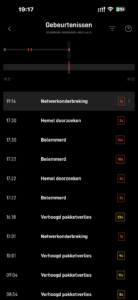
The app showed occasional outages. Video calls, remote desktops, VPN sessions, and live broadcasts can be sensitive to those gaps. Don’t infer a continuous connection from one good speed test.
Wind and mounting
In one test period, I reported very strong winds and used a heavy sandbag on the stand. The equipment remained in place and the link stayed usable. That was an observation, not a certified wind test or mounting recommendation.
A permanent installation needs suitable mounting for the location and hardware. A sandbag isn’t a substitute for a properly designed roof or pole installation.
Why I pack it away
The accessible garden location makes me concerned about theft or damage, and I don’t need the link continuously. After testing, I bring the kit back inside.
For rural locations or a cable outage, an independent satellite route may be valuable. It still needs power, a suitable plan, a clear view, and working upstream infrastructure. Check Starlink’s current terms before assuming a stored kit can be activated anywhere immediately.
If I needed it as my primary connection, I would prioritize secure permanent mounting and unobstructed placement. For now, it remains a piece of technology I enjoy testing.
Images from the original article